This is used in the Optimize Best Values tool to configure the items that will be included in an optimization model. A constraint item is added to a Constraint Group and could be an individual product, or the channels through which it is applied. Each item can have its own Cost and Value associated with it, as well as its own set of constraints.
Add a new blank Constraint Item by selecting from the 'Create New' dropdown from within the constraint group area, or drag in the tool from the toolbox.
Alternatively you can automatically configure multiple constraint items simultaneously by dragging in a column from the Data Explorer, for example 'Product Code', which will automatically create a Constraint Item for each discreet value in the column. This method will automatically create a propensity model for each item using all the columns on the resolution table (specified on the Optimize Best Values window).
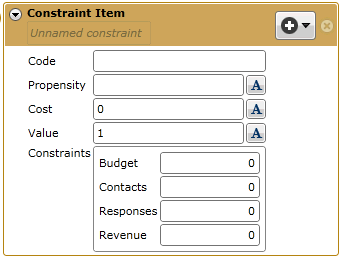
A blank constraint item will appear as below:
Code: Enter a unique code to identify the item.
Propensity: Drag in a Predict Inclusion propensity model to use for this item.
Cost: This is the cost of sale for this item.
Value: This is the value of a sale of this item.
Constraints: These are the same constraint options available at the model level, but will obviously only apply to the individual item. They are hard limits that the model will adhere to.
Budget: This is the total amount of budget available for this item.
Contacts: This is the limit to the number of contacts that we wish to make
Responses: This is the limit to the number of responses that we can handle. A limit may be imposed because there is limited stock of a particular product.
Revenue: This is the projected revenue that we are intending to earn for this item.