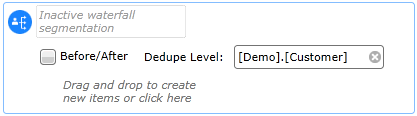
This tool can be used within a campaign track to create multiple segments where records are allocated to mutually exclusive groups, with the remainder cascading down to form the available universe for the next group. So if a record meets the criteria of the first group in the waterfall then they will be included in it, even though they may also meet the inclusion criteria of the next group. Each group can then be assigned an action - allocated to a cell or be assigned a Tactic.
For example, the waterfall criteria could be used to separate active customers from lapsed customers where you wish to communicate with these two groups differently. The remainder from the waterfall could be classified as prospects and assigned to another campaign track.
Using the Waterfall Segment tool
Drag the tool into the required timeline node.
Before/After: Checking this box will add two additional nodes to the waterfall, one before and one after the waterfall branch. This allows you to apply an action to all records that have been selected by the waterfall before they enter a node, and another to all records after their node action has been applied. Note that the implication of this is that where a file output tactic has been implemented against a banded column, then two output files will be created for each 'when' band.
Dedupe Level: This defines the table resolution level for ensuring mutual exclusivity. For example, where customers have made multiple orders, deduping on the Customer table will ensure that each customer is only allocated to a single segment.
Alternatively if you set the de-dupe level to be 'Household' you will get a single record selected per household.
The area below is the standard segment editing tool where you can drag in segments from the Data Explorer or make a selection from the 'Create new...' drop-down to engineer a segment. Each segment that you build will create a mutually exclusive When node below, which you can then add individual actions to.
By default there is a Remainder node that you can also add actions to. You should also note that if you have selected the de-dupe level to be Household, the remainder will include any records that were de-duped in the previous waterfall branches along with any records that were not selected. This can enable you to send these recipients to other tracks for further processing.
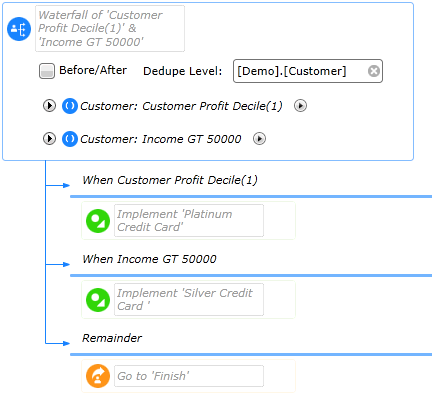
In the example below the remainder is sent to a Finish track.
When using a random sample in a Waterfall Group it is important to understand how the system calculates the number of people included in that sample.
The screen shot below shows a waterfall segment with an audience of 40,857. Waterfall groups are calculated against this audience.
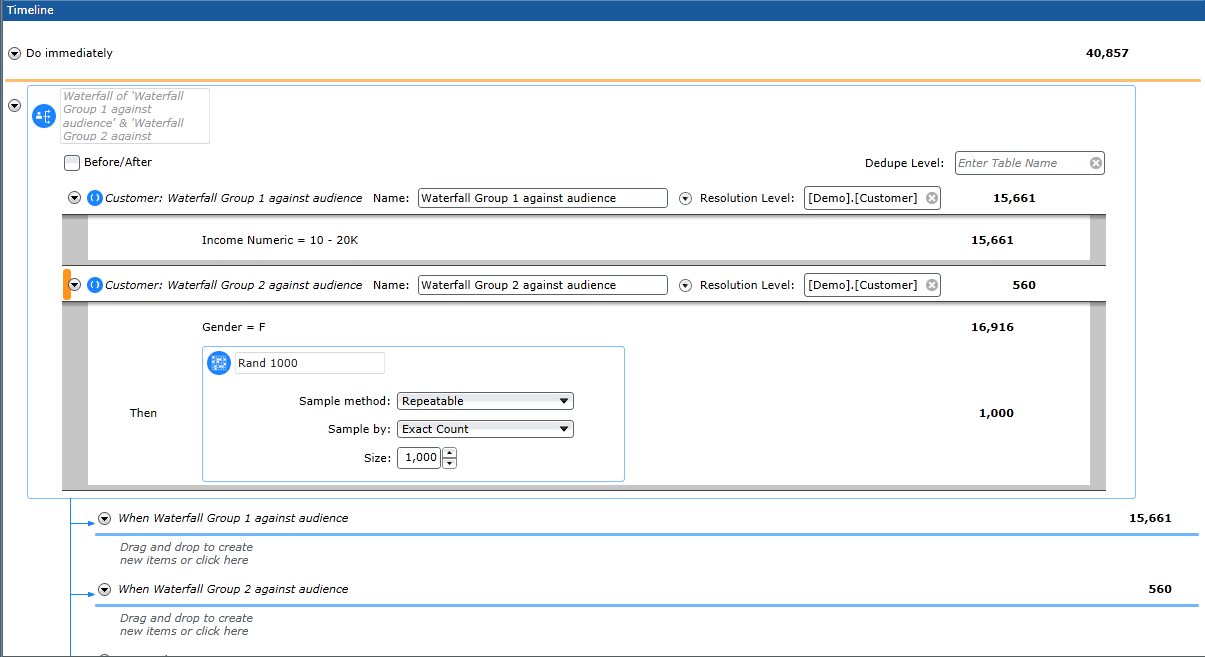
Within the first waterfall segment the figure returned is 15,661. This means that out of the audience figure of 40,857 there are 15,661 customers whose income = 10-20k
Within the second waterfall group the count of 16,916 means that against the audience there are 16,916 female customers. In the second group we have asked for sample of 1000 females to be sent the campaign, a figure which we believe is achievable owing to the fact there are 16,916 people within the Waterfall Group. However the figure returned shows that the sample will only be sent to 560 female customers. The reason for this is that if a person meets the criteria of the Waterfall Group above then they belong to that Waterfall Group and are excluded from any others. Therefore out of the 1000 samples generated 440 females were included in Waterfall Group one, and therefore could not be processed in Waterfall Group 2.